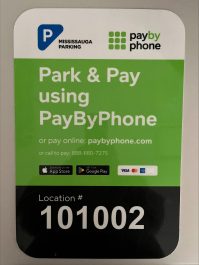
PayByPhone, a parking solution that allows drivers to pay for parking using their phone, will be piloted in Streetsville in all municipal paid parking areas starting on Tuesday, July 7.
City services | June 29, 2026
PayByPhone can be used through a mobile phone app, making a phone call or visiting a website. In addition to the existing payment options to pay at the paid parking machines using coins and credit cards, this option gives residents and visitors a more convenient way to pay for parking. PayByPhone is completely cashless, sends reminders when the parking session is about to expire and lets drivers extend their parking time from anywhere.
How to use PayByPhone
- Access PayByPhone
- Download the PayByPhone app from Google Play or the App Store on your mobile device
- Visit paybyphone.com
- Call 888-680-7275
- Provide your phone number, email address, credit card number and licence plate number.
- Enter the Zone ID (6-digit number) which will be displayed at the parking location. Please note, parking purchased in a selected zone is valid for that zone only and is not transferable to other zones.
- Choose how long you plan to park for and then confirm your selection.
- Extend your parking session anytime. If you need to extend your parking session, you can add more time from the app without having to rush back to your car.
Enforcement Officers will be able to verify the status of active parking sessions in real time on their handheld devices.
Reminder, QR codes are not a legitimate method of payment for parking at the City of Mississauga. The only way to pay for parking is through the parking machines or by using the PayByPhone app if you’re parking in Streetsville.
Find out which municipal parking lots and Paid on-street parking has PayByPhone.
For more information about PayByPhone, visit paybyphone.com.